Feature Attribute Annotation
Tools for creating Annotation Features
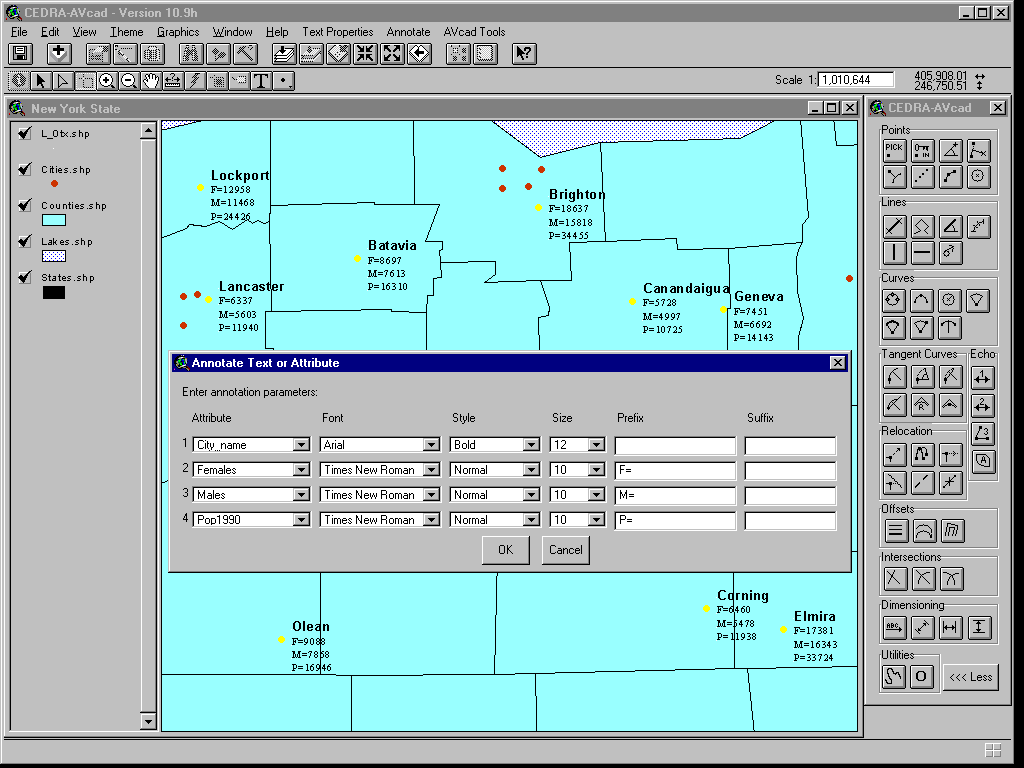
Within the CEDRA AVseriesTM software (ArcView® GIS and ArcGIS® implementations) is a command, [Text or Attribute] under the main menu item {Annotate}, which enables the user to create text for the value(s) that are associated with a field or multiple fields in a single operation. For example, in the figure shown below it is desired to annotate or create text representing the name of a city, the number of females and males within the city and the city's population. The [Text or Attribute] command offers the user the ability to specify the field or fields that should be processed as well as the ability to control the "look" of the text that is created. This command is available in both the ArcView® GIS and ArcGIS® environments.
|
|
 |
CEDRA-AVseriesTM
When creating text for certain fields in a database, the user
should first select the feature or features that are to be processed.
Once selected, the [Text or Attribute] command can be activated.
The user will then be asked to identify the field or fields that
are to be used in the generation of text. A dialog box similar
to that shown above will then be displayed. On a row by row basis,
the field or fields identified by the user will be listed. The
default order of the fields will correspond to their order in
the database. The user, at this point, can control the order of
the text by selecting the appropriate field from the Attribute
pull-down list. The order in which the fields are listed in the
dialog box will reflect the order in which the text is listed
on the map.
For each field, in which text is to be created, the user is able
to control the font, font style and font size that is used in
creating the text. Any true-type font installed on the computer
is available to the user for selection. In addition, the user
is able to specify a prefix and/or suffix to the text. As shown
above, for the city name a larger text size is used as well as
a bold font style, while for the other fields various prefixes
are entered to help identify the field that is shown. There is
no limit to the number of fields or number of selected features
that can be processed.
Once created, the user has the ability to reposition the text
to eliminate any overlap or interferences, if any, using any of
the available relocation tools.
The [Text or Attribute] command will process Point, Line and Polygon
features and always lists the text in a vertical fashion. Users
involved with surveying or engineering applications will find
this command an ideal tool for labeling curve data, while those
involved with marketing or business applications will find this
command extremely helpful in transferring database information
onto a map.
For more information on CEDRATM software and services click on this link to Send an E-mail to CEDRA